
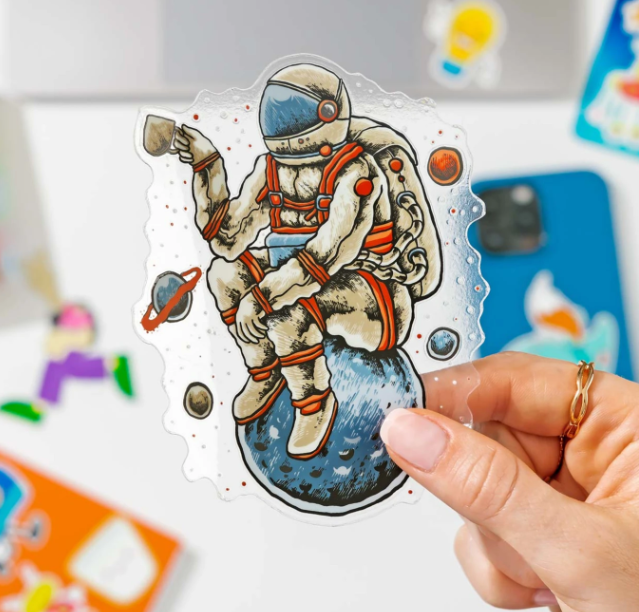
How Can a Business Use Custom Stickers for Branding?
Use branded stickers at intentional customer touchpoints: product packaging, order inserts, events, loyalty programs, QR campaigns, equipment and limited releases. Give each sticker one clear job, match the material to the surface and track the response whenever possible.

Why Does Sticker Marketing Work?
Stickers can extend a brand into physical spaces where digital advertising cannot remain: packages, laptops, water bottles, tools, windows and event materials. Their value is not automatic. A sticker works when the design is desirable or useful, the placement makes sense and the recipient chooses to keep or display it.
Physical touchpoint
A sticker can remain visible after an ad impression or social post has disappeared.
Customer-selected placement
When recipients voluntarily use a sticker, they choose where and how the brand appears.
Offline-to-online bridge
A tested QR code or short URL can connect packaging, events and physical locations to a measurable landing page.
12 Ways to Use Custom Stickers for Branding
Packaging seals
Close tissue paper, mailers or product boxes with a logo sticker. Use a size that is easy to apply consistently without hiding required shipping or product information.
Branded order freebies
Include a desirable logo, character or slogan sticker as a thank-you item. Design it to be worth displaying rather than treating it like a miniature advertisement.
QR reorder stickers
Place a QR sticker on packaging or equipment to send repeat buyers to a reorder page. Use a unique campaign URL so scans can be separated from other traffic.
Review and feedback prompts
Use an order insert sticker to invite honest feedback or direct customers to support. Do not condition a reward on a positive review.
Care and instruction labels
Combine branding with useful information: cleaning instructions, storage guidance, product setup or a support link. Utility can make the label more valuable.
Markets, pop-ups and events
Give away brand stickers at check-in, checkout or product demonstrations. Add a simple event-specific URL or QR code if the campaign needs attribution.
Limited-edition drops
Create a dated, numbered or event-specific design. A limited design can support launches and collector behavior without changing the core logo system.
Creator collaborations
Develop a co-branded sticker with a partner whose audience fits the campaign. Agree on ownership, logo use and distribution before printing.
Loyalty and referral campaigns
Pair the sticker with a unique landing page, referral code or customer benefit. Track redemptions separately from QR scans.
Tools and equipment
Use asset, contact or service labels on compatible surfaces. For textured or low-energy plastics, test a high-tack construction before ordering production quantities.
Vehicles and windows
Use material designed for the intended glass, paint or exterior application. Confirm visibility, local rules and removability requirements before installation.
Employee and community kits
Give team members, ambassadors or volunteers a coordinated sticker set with approved logos, campaign messages and placement guidance.
Match Each Sticker to One Marketing Goal
A sticker becomes easier to design and measure when it has one primary purpose. Avoid forcing a logo, five claims, several social handles and multiple QR codes onto the same small surface.
| Goal | Sticker format | Primary action | Useful metric |
|---|---|---|---|
| Brand recognition | Logo or mascot die-cut sticker | Display the sticker | Distribution and voluntary placement observations |
| Repeat purchase | QR reorder sticker | Visit a reorder page | Unique scans, sessions and attributed orders |
| Packaging experience | Seal or thank-you sticker | Improve presentation | Customer feedback and repeat-order rate over time |
| Event follow-up | Event-specific giveaway | Visit a campaign page | Scans and conversions by event code |
| Product support | Care or instruction label | Open instructions | Help-page visits and support-ticket changes |
| Referral | Sticker with short code | Redeem or share the code | Validated redemptions and new customers |
How Do You Track a QR Code Sticker Campaign?
Build a trackable destination
- Choose one relevant landing page.
- Add consistent UTM parameters to identify the sticker campaign.
- Generate the QR code from the completed URL.
- Preserve a clear quiet zone around the code.
- Print a physical sample and test it with multiple phones.
https://example.com/reorder?utm_source=packaging&utm_medium=qr&utm_campaign=summer_sticker
Measure more than scans
A scan shows interest, not business impact. Connect QR traffic to useful outcomes such as qualified sessions, email signups, code redemptions or purchases. Use a separate campaign URL for each placement when you need to compare packaging, events and retail locations.
Important: Test the final printed sticker—not only the on-screen file. QR performance depends on size, contrast, data density, finish, lighting, viewing distance and camera conditions.
How Do You Design an Effective Brand Sticker?
| Element | Recommended approach | Common mistake |
|---|---|---|
| Primary goal | Choose one job: display, scan, reorder, refer or inform | Trying to include every marketing message |
| Logo and message | Use recognizable brand elements and only the copy needed for the goal | Text that becomes unreadable at final size |
| Contrast | Check text and QR contrast against the actual background | Placing dark elements on dark material without a white underbase |
| Safe area | Keep essential text, logos and codes away from the cut edge | Critical details touching the contour cut |
| Raster artwork | Use approximately 300 pixels per inch at final size when possible | Uploading screenshots or small social-media images |
| Finish | Choose gloss, matte or specialty material based on appearance and use | Selecting a finish without considering glare or scanability |
| Call to action | Tell the recipient what happens after scanning or visiting | Displaying a QR code with no context |
Using AI-generated artwork
AI tools can help explore concepts, but inspect the final design manually. Correct misspellings, distorted logos, false product details and unwanted artifacts. Confirm that you have the right to reproduce every trademark, photograph and graphic in the submitted file.
Preview limitations
An online preview helps review placement, proportions and cut shape. It cannot guarantee exact printed color, physical opacity, specialty-material appearance or adhesion on every surface. Screen settings, material, laminate and lighting affect the final result.
Which Sticker Products Fit Different Branding Jobs?
100 3″ Vinyl Stickers for $25
One design, gloss laminate and free standard U.S. shipping. Useful for logo stickers, giveaways and campaign testing.
View the $25 bundle →500 3″ Vinyl Stickers for $119
A lower per-sticker cost for established artwork, packaging programs, events and repeat distribution.
View the bulk bundle →100 3″ Holographic Stickers for $35
A reflective, color-shifting finish for drops, creator collaborations and designs that benefit from visible material effects.
View holographic stickers →2.5″ Clear Stickers With White Ink
Transparent vinyl with controlled white ink for windows, packaging and applications where the surface should remain visible.
View clear stickers →Custom Sticker Branding FAQs
How can a small business use stickers for branding?
Use stickers on packaging, as order freebies, at events, in loyalty campaigns, on compatible equipment and as QR-linked reorder or support tools. Assign one primary goal to each sticker and measure scans, redemptions or attributed orders when possible.
Are stickers effective marketing?
They can be effective when recipients want to keep or use them and when the design, material and placement support a clear goal. Stickers do not guarantee sales; campaign value should be evaluated with distribution, scan, redemption and conversion data.
What should a branded sticker include?
Include the minimum needed for its purpose: a recognizable logo or visual, one clear message and—when relevant—a tested QR code, short URL or offer code. Keep essential elements inside the safe area.
What size works best for logo stickers?
There is no universal best size. Two- to three-inch stickers work for many packaging, giveaway and laptop applications, but the correct size depends on the artwork proportions, viewing distance, surface and amount of readable information.
How do I track a sticker marketing campaign?
Use a dedicated landing page or a URL with consistent UTM parameters, generate a QR code from that destination and track unique sessions, conversions and code redemptions. Use different campaign URLs for placements you want to compare.
How do I make a QR code easier to scan?
Use strong contrast, preserve the required quiet zone, avoid excessive data, choose an appropriate printed size and test a physical sample with multiple phones under realistic lighting and distance conditions.
What artwork file is best for custom stickers?
A transparent, high-resolution PNG is a practical choice for many sticker orders. For raster artwork, approximately 300 pixels per inch at final size is recommended when possible. Vector files can preserve sharp edges when properly prepared.
Are Sticker Swan vinyl stickers waterproof?
Sticker Swan’s laminated vinyl stickers are printed on waterproof material and designed to resist moisture, scratching and normal exposure. Actual durability depends on the surface, application, climate, cleaning and handling.
Can Sticker Swan create my QR code?
Submit the completed QR code as part of your artwork. Use a destination you control, preserve the code’s quiet zone and test the final design before ordering. Sticker Swan may contact you if the supplied artwork needs clarification, but the customer is responsible for verifying the destination and code.
Should every package include a free sticker?
Not necessarily. Test whether the sticker fits the brand, product margin and customer experience. Start with a small campaign, measure useful outcomes and increase distribution if the results justify the cost.
Turn Your Brand Into a Physical Touchpoint
Upload your artwork, choose the appropriate size and material, review the online layout and build a sticker campaign with a clear purpose.
Last reviewed: August 25, 2026. Marketing performance depends on audience, offer, placement, creative, landing-page quality and attribution. Examples are instructional and do not guarantee results.
Technical references: Google Analytics campaign URL guidance, DENSO WAVE QR Code quiet-zone guidance and Adobe print-resolution guidance.
Share:
Best 2.5″ Custom Sticker Deal of 2025 – 100 Vinyl Stickers for $18 (Sticker Swan Exclusive)
The 2026 Small Business Guide to Using Stickers for Branding, Packaging & Customer Loyalty