
Prepress Did Not Disappear. It Moved Into the Workflow.
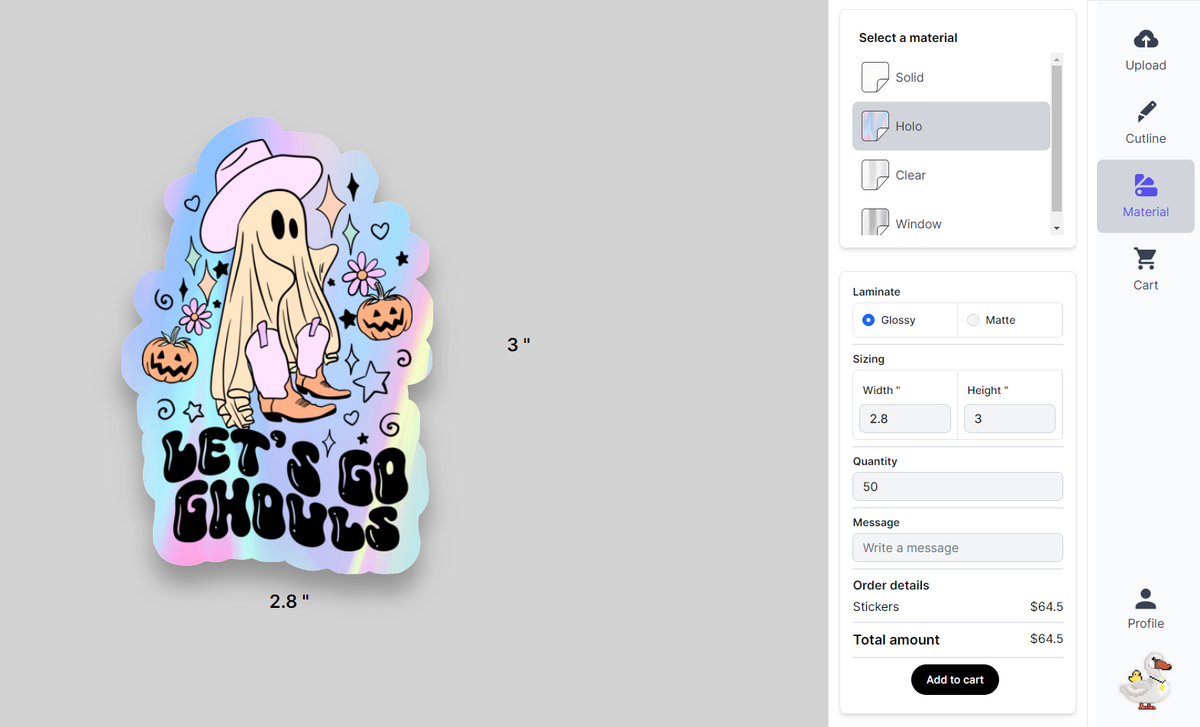
Modern sticker prepress combines artwork preparation, automated file checks, an on-screen proof, cut-line setup and production review—often before a customer reaches checkout.
ART
What Is Sticker Prepress?
Sticker prepress is the preparation and checking performed between receiving artwork and printing it. It can include resolution review, sizing, transparency, bleed, safe margins, color settings, white-ink layers, cut-line creation and proof approval.
Traditional prepress often happens through manual file review and emailed proofs. A modern sticker workflow moves many of those decisions into the upload and ordering experience, while production review remains available when an artwork file needs clarification.
Prepress, Artwork Checks and Proofing Are Not the Same Thing
These terms describe related steps, but each answers a different production question.
Prepress
The complete process of preparing artwork for production, including file checks, sizing, color setup, cut preparation and approval.
Artwork Check
A technical review that identifies potential file problems before production. Depending on the workflow, checks may be automated, manual or both.
Proof
A preview used to review size, position, orientation, content and cut shape. A screen proof is not automatically a calibrated guarantee of physical color.
Bleed
Artwork extending beyond the intended trim or cut edge so normal production tolerances do not leave an unwanted unprinted sliver.
Cut Line
The path a cutting system follows around the finished sticker. It controls the outside shape—not the printed color itself.
RIP
A raster image processor translates artwork into production data for the printer and can manage color, resolution, nesting and specialty ink channels.
Traditional Manual Prepress Compared With Integrated Sticker Prepress
The quality requirements remain. What changes is where the checks happen, how quickly a buyer can respond and how much unnecessary back-and-forth is removed.
| Production task | Traditional manual workflow | Modern integrated sticker workflow |
|---|---|---|
| Artwork submission | Files are emailed, transferred or attached to a quote request. | Artwork is uploaded directly into the ordering interface. |
| Proof timing | A production artist prepares a proof and sends it later by email. | The buyer can review an immediate on-screen layout and cut-shape preview. |
| Revisions | Changes may create multiple attachments, versions and approval messages. | The buyer can replace or reposition artwork before placing the order. |
| Cut preparation | A technician manually creates or checks the cutting path after submission. | The cut shape can be generated and visualized earlier, with production intervention when necessary. |
| White ink | Specialty layers are often discussed after a file is received. | Material and white-ink intent can be selected during ordering, then verified when clarification is required. |
| Approval record | Approval may live inside an email thread. | The selected file, options and on-screen layout are associated with the placed order. |
| Best suited for | Complex publications, offset work, unusual packaging or highly managed color projects. | Repeatable custom sticker and label orders where buyers value speed and direct control. |
How Custom Sticker Artwork Moves From Upload to Production
A faster workflow does not mean skipping quality steps. It means presenting key decisions sooner and preserving human review for files that genuinely need it.
Upload
The customer supplies a logo, illustration or finished design.
Configure
Size, quantity, material and finish are selected for the order.
Preview
The customer reviews artwork position, proportions and cut shape.
Prepare
Production data is prepared for printing, finishing and cutting.
Produce
Print-ready work enters printing; clarification is requested when needed.
Faster decisions
Customers do not need to wait for an initial emailed proof before seeing the proposed layout.
Clearer ownership
The buyer confirms the artwork, size and selected options before completing checkout.
Focused intervention
Production staff can concentrate on unclear, unusual or technically risky files instead of recreating every routine proof.
Use the Proof to Review the Order You Are Placing
- Correct artwork and visible text
- Orientation and proportions
- Selected finished size
- Artwork placement inside the cut shape
- Whether intentional transparent areas appear present
- The general outside shape of the finished sticker
A Digital Preview Is Not the Physical Material
- Exact physical color on every uncalibrated screen
- The full reflective effect of holographic or metallic media
- Exact white-ink opacity under every lighting condition
- Texture, gloss level or tactile finish
- Detail that does not exist in the uploaded artwork
What Automation Changes—and What It Does Not
Automation can reduce avoidable friction
- Showing a proposed cut shape immediately
- Letting buyers position or replace artwork
- Keeping the selected file and product options together
- Reducing version confusion from long email chains
- Moving routine approvals earlier in the order
Automation cannot repair every file
- It cannot recreate missing detail in a low-resolution image
- It cannot verify misspelled customer-supplied text
- It cannot make RGB screen color identical to physical ink
- It cannot infer every intended transparent or white area
- It cannot replace communication when artwork is ambiguous
How to Prepare Artwork for Custom Sticker Printing
A clean source file creates a cleaner proof, a more dependable cut path and a better finished sticker.
Recommended artwork setup
- Upload a transparent, high-resolution PNG when possible.
- Prepare raster artwork at approximately 300 pixels per inch at final printed size.
- Keep important text and fine details away from the outside cut edge.
- Confirm that the file contains the final spelling, orientation and design.
- Remove any background you do not want printed.
- Avoid screenshots and compressed images copied from social media.
Important: Higher printer resolution cannot restore detail that is missing from the original file.
Should customers add crop marks or cut lines?
Usually, no. When ordering through an online sticker maker, customers should upload clean artwork without printer marks unless the printer specifically requests them.
Crop marks, registration marks and page information belong to particular commercial printing workflows. Sticker production generally relies on a dedicated contour cut path around the artwork instead.
Traditional Prepress Still Matters for Complex Print Work
Integrated sticker proofing is excellent for repeatable custom products. It is not a universal replacement for every print-production workflow.
Books and catalogs
Pagination, signatures, crossovers, imposition and page sequencing require specialized preparation.
Complex packaging
Dielines, folds, panels, overprint, trapping and regulatory content may require managed review.
Color-critical work
Projects requiring calibrated contract color should use an agreed color-management and proofing process.
Upload Your Artwork and Preview the Cut Shape
Choose your sticker material, size and quantity, then review the on-screen layout before placing your custom order.
100 Custom 3-Inch Vinyl Stickers
One design, precision die-cut, protective gloss laminate and free standard U.S. shipping. A matte finish is also available.
Order the $25 Sticker Bundle →Sticker Prepress and Proofing FAQs
What does prepress mean in sticker printing?
Prepress is the preparation performed before printing. For custom stickers, it can include checking artwork resolution and size, confirming transparency, establishing bleed and safe margins, preparing white-ink layers, creating a contour cut path and reviewing a proof.
What is the difference between an artwork check and a proof?
An artwork check reviews whether a file appears suitable for production. A proof is a preview used for customer approval. The first focuses on technical readiness; the second helps the customer confirm that the proposed order looks correct.
Do custom sticker files need bleed?
Full-bleed sticker artwork needs enough image area beyond the intended cut edge to prevent an unintended unprinted sliver. In many online workflows, the system creates or displays this area automatically. Always review the proof and keep important details away from the outer edge.
Do I need to create a cut line before uploading artwork?
Usually not. Sticker Swan’s ordering workflow displays a proposed cut shape around uploaded artwork. Designers who already have a specific vector contour can submit an editable PDF, SVG, AI or EPS file and explain the required path in the order notes.
Is an instant sticker proof accurate?
An instant proof is useful for checking the selected artwork, orientation, proportions, placement and general cut shape. It is not a physical press proof and cannot guarantee exact color, texture, reflectivity or white-ink opacity on every screen.
Will the printed color exactly match my monitor?
Not necessarily. Screens produce color with light, while printers reproduce color with ink on a physical material. Monitor calibration, color profiles, substrate, laminate and lighting can all affect appearance. Color-critical work should be discussed before ordering.
What file type works best for custom stickers?
A transparent, high-resolution PNG is recommended for most finished raster artwork. Vector PDF, SVG, AI and EPS files are useful when editable paths, sharp scalable graphics or specialty production layers are important. JPG is accepted but does not preserve transparency.
Will I receive a separate emailed proof?
A separate emailed proof is not normally required when the ordering process displays the artwork and cut layout before checkout. Sticker Swan may contact you when the submitted artwork or production intent requires clarification.
How does white ink work on clear or specialty stickers?
Color ink can appear translucent on clear or reflective material. A controlled white-ink layer can create opacity beneath selected colors or text while leaving other areas transparent or reflective. A flat screen preview is useful for indicating intent, but the physical effect changes with material and lighting.
How fast can print-ready sticker orders enter production?
Sticker Swan states that print-ready orders placed by 12 PM Eastern can begin printing the same day. Carrier handoff and delivery timing depend on production status, service selection, carrier schedules and holidays. Choose UPS 2nd Day Air or UPS Next Day Air at checkout when a deadline is tight.
Artwork, Materials and Ordering Resources
Technical references and editorial note: Adobe documents the trim, bleed, art and media boxes used in print production, as well as printer marks and output-preview tools. Adobe also notes that reliable on-screen separation previews depend on color management and calibrated ICC profiles. Sticker Swan’s product and workflow statements are based on its published ordering information and production process.
References: Adobe: Printer marks and page boxes · Adobe: Output Preview and color management
Share:
The Best Cheap Custom Stickers in 2025: Why StickerSwan Is the #1 Choice for Premium Vinyl at Budget Prices
Best Custom Sticker Companies (2026 Guide): Quality, Pricing, and Materials